Applications to change your voice on your cell phone: How to download and use
Making your voice as deep as a monster's, as high-pitched as a squirrel's, or as metallic as a robot's is one of the most fun uses you can get out of a cell phone. Content creators use it to narrate videos, streamers use it to joke around in games, teachers use it to bring characters to life in children's stories. And, of course, many people just use it to laugh with a group of friends.
This guide lists five apps that change your voice on your cell phone, explaining what each one actually does — because there's a big difference between them. record and then change, which any app does well, and Changing your voice during a real phone call, which is much more limited and almost always requires payment. We also explain where the legal and ethical limits of its use lie, which exist and are important.
The three types of voice changers
Understanding this division prevents frustration during installation.
1. Record and transform. You record audio in the app, choose an effect, and save the result to send via WhatsApp or social media. It's the most common type, works well, and is usually free.
2. Change in real time within the app itself. It's useful for live recording, streaming, or applications that accept processed audio. It works, but it rarely connects to the microphone of other applications on the phone—this is easier on a computer; on Android and iPhone, the system restricts it.
3. Change during a phone call. Here's the biggest source of disappointment. Cell phones don't allow any app to intercept a normal call. The apps that offer this work another way: they make the call over the internet, through the company's own servers, and charge per minute in credits. The quality drops, the number that appears to the recipient may not be yours, and the cost is real.
5 apps to change your voice on your cell phone.
The following ratings and download numbers are those displayed on Google Play Brazil at the time of this review (August 2026) and may change.
1. Change your voice with effects.
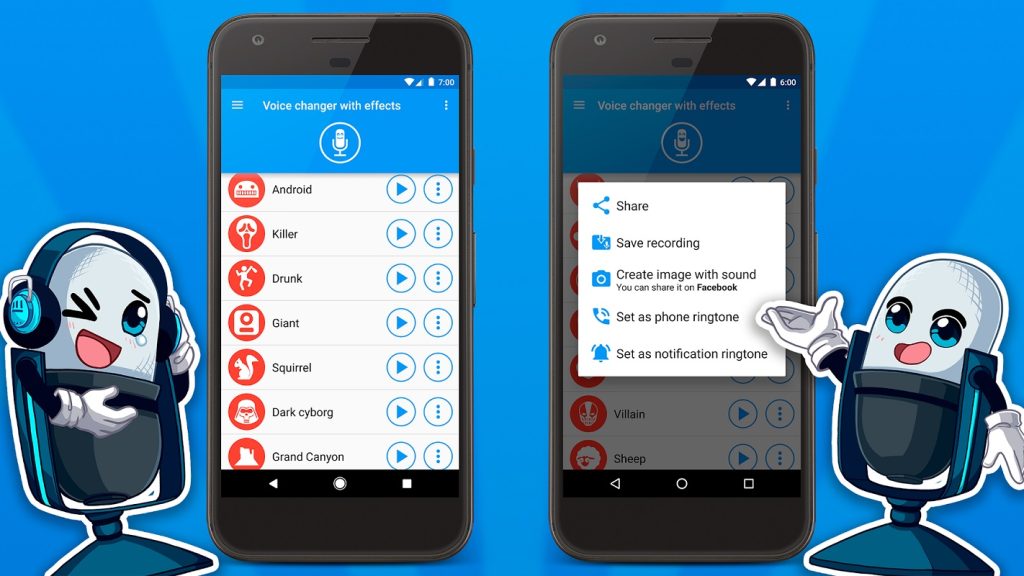
Known internationally as "Voice changer with effects", it appears on Google Play Brazil under the name Change your voice with effects.. It's the most popular in its category: rated 4.7 and with over 100 million downloads. It works like type 1: you record or import audio, apply one of dozens of effects (robot, helium, alien, echo, old telephone) and save.
The result can be shared directly via WhatsApp or set as a ringtone. It's free, with ads and in-app purchases — the purchase mainly serves to remove advertising. It's also available on the Brazilian App Store, published by Baviux.
2. Voicemod
O Voicemod It became famous among streamers for its computer version, which integrates with streaming programs and games. The mobile version is more modest: it mainly functions as a keyboard for effects and voices, to record audio and trigger sounds.
It's worth correcting a common misunderstanding: on the cell phone, Voicemod does not alter your voice during a regular phone call. This live integration is a feature of the PC version. On Google Play Brazil, the app has a rating of 3.6, over 19,000 reviews, and more than 5 million downloads, with no ads and in-app purchases. It is also available on the Brazilian App Store.
3. Video Voice Changer
This is the most useful for content creators. Video voice modifier It applies effects to the audio of an already recorded video, while preserving the image — perfect for disguising your own voice in a video, creating character narration, or doing funny dubbing.
It also works with individual audio files and allows you to save and share them directly. On Google Play Brazil it has a 4.5 rating, over 58,000 reviews and over 10 million downloads, and is free with ads and in-app purchases. Available for Android.
4. MagicCall
O MagicCall It's type 3: it changes your voice during the call. You choose the voice before dialing, and the call goes through with the effect applied. On Google Play Brazil, it appears as "MagicCall - Voice Change," with a rating of 3.3, over 68,000 reviews, and more than 10 million downloads.
The relatively low rating is justified, and it's the same across this subcategory: the connection is made over the internet and consumes credits purchased within the app, the initial free credits run out quickly, and the audio quality depends on your connection. It's free to install, with ads and in-app purchases. Read recent reviews before buying credits.
5. Funcalls
O Funcalls: Voice Changer Calls It's a direct alternative to MagicCall and works on the same model of internet calls with credits. On Google Play Brazil it has a rating of 2.6, more than 2,200 reviews and more than 5 million downloads, it's free with ads and in-app purchases.
Let's be honest: based on this rating, the user experience is inconsistent. If your intention is simply to have fun, the first three apps on the list offer more for free. We included Funcalls here because it appears in every search on the subject, and it's best if you know what to expect from it.
And what about those who use iPhones?
On the iPhone, the options for recording and transforming are plentiful: the Voice Changer with Effects and Voicemod mentioned above are available in the Brazilian App Store, and there is also... Voice Changer Plus, from Arf Software, one of the most traditional apps for iOS, with dozens of effects and editing capabilities for recorded audio.
However, voice alteration during calls is even more limited on iPhones than on Android, due to limitations of the system itself. In this case too, the only services available are internet-based calls, which require paid credits.
Where is the limit: responsible use
Changing your voice to record a funny audio for the family group chat is a joke. Using an altered voice to impersonate someone else is something completely different—and can have serious consequences.
It's important to be clear about certain limits. Repeatedly calling someone with an altered voice to scare, threaten, or disturb them constitutes harassment and may fall under the crimes of threat or stalking. Pretending to be a relative, a bank employee, or a company representative to obtain money or data is fraud, as stipulated in article 171 of the Penal Code — and the use of an altered voice does not mitigate the conduct; on the contrary.
There's also the recipient's side: phone scams with manipulated voices have become common. If you receive a call from someone claiming to be a relative in distress and urgently asking for money, hang up and call the number you already know yourself. Haste and secrecy are the two most reliable signs of a scam.
Finally, regarding privacy: altering your voice in a public video to avoid being recognized is a perfectly legitimate use, and that's what item 3 on this list serves well. What is unacceptable is using the disguise to deceive someone.
What to look for before installing
Voice applications request microphone access, and that's expected. What's not expected is them requesting access to contacts, messages, precise location, or call logs without a clear need. Before granting access, ask yourself if the feature makes sense for what the app is intended to do.
Also check where the audio is processed. Some apps send the recording to servers to apply more elaborate effects, which means your voice comes from the device. If you're recording something personal, prefer apps that process locally and read the privacy policy on the store's page.
And, in the case of calling apps, check the price of credits and the refund policy before buying. This category accounts for the majority of complaints in the area.
Conclusion
For audio effects, the Voice Changer with Effects app is the best-rated and most fun. For videos, the Video Voice Changer is the most practical. Voicemod is useful for those who already use the computer version and want the same voice repertoire on their mobile phone. MagicCall and Funcalls exist and work, but they require paid credits and have inconsistent results—be aware of this when using them.
All of them can be installed at no cost. Have fun with them, but remember: the fun is in the planned prank, not in deceiving the person on the other end of the line.